

E ink mobile phone for reading, travel, and work focus
Does an e ink mobile phone really reduce eye strain and improve focus?
An e ink mobile phone uses a paper-like display that reflects light instead of emitting it, reducing blue light exposure and visual fatigue. Many users report up to 50–70% less eye strain during long reading sessions, along with improved focus thanks to the distraction-free, glare-free screen.
E ink mobile phone for reading, travel, and work focus
What is e ink display and why are more people switching to it for daily screen use? From surprising insights into e ink display vs oled eye comfort to the real android e ink phone pros and cons, this guide uncovers how these screens reduce strain and boost focus. If you're searching for a practical guide to eye friendly devices children can safely use, the answers may challenge everything you thought you knew about modern screens—are you ready to see the difference?
⏱ 8 min read
Ever noticed your eyes burning after just 30 minutes on your phone—or your child blinking more often during screen time?
You're not alone. Modern screens are bright, fast, and addictive—but not always gentle on your eyes.
What if your phone could feel more like paper than a glowing screen?
👉 Curious how a distraction-free screen feels in real life?
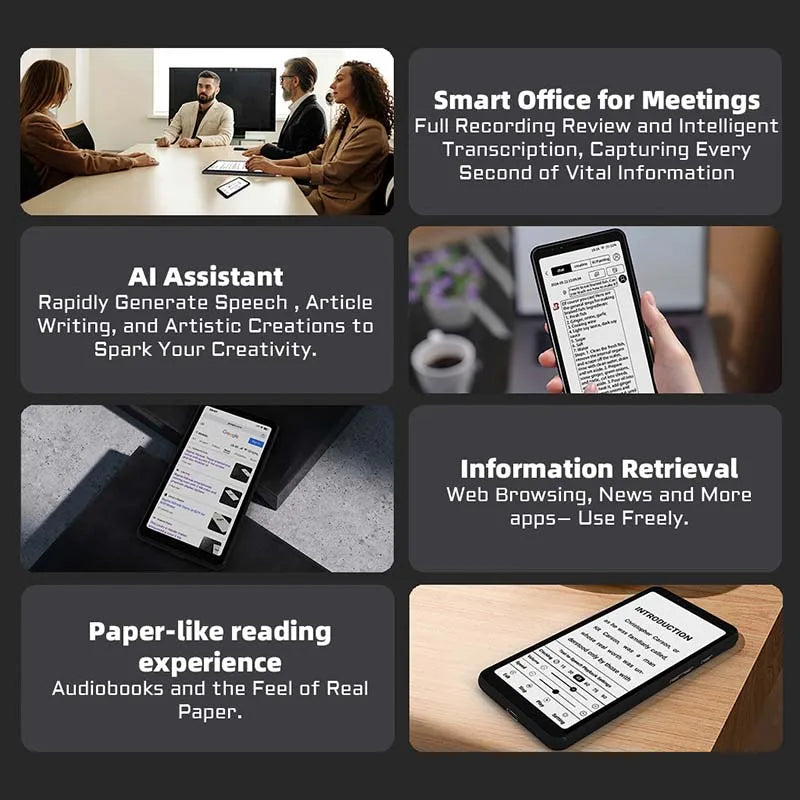
e ink mobile phone for reading and focus 💡 See it in action
What is an e ink mobile phone?
An e ink mobile phone is a smartphone that uses electronic ink technology instead of traditional LCD or OLED screens. It mimics printed paper by reflecting ambient light, making it easier on the eyes and highly energy-efficient.
- No harsh backlight
- Minimal blue light exposure
- Readable even in direct sunlight
- Extremely long battery life
Think of it as combining the functionality of a smartphone with the comfort of reading a book.
Why e ink screens feel better on your eyes
If you've ever struggled with headaches, dry eyes, or poor sleep after screen time, the display type matters more than you think.
How this screen reduces eye strain naturally
- No flicker: Unlike LCD screens that refresh constantly
- No glare: Perfect for outdoor use
- Low blue light: Helps protect sleep cycles
- Matte texture: Feels like reading paper
Parents especially notice a difference when children switch to eye-friendly screens for reading or learning.
For more ways to support healthy habits, explore Health & Safety essentials designed for daily comfort and protection.
E ink phone vs LCD/OLED for kids and adults
| Feature | E Ink | LCD/OLED |
|---|---|---|
| Eye Comfort | ✅ Very high | ❌ Moderate to low |
| Battery Life | ✅ Days to weeks | ❌ 1–2 days |
| Outdoor Visibility | ✅ Excellent | ❌ Poor in sunlight |
| Color & Video | ❌ Limited | ✅ Excellent |
Key takeaway: If your priority is comfort, focus, and reading—e ink wins. If you need video and gaming, traditional screens still dominate.
How this compact e ink phone fits your daily life
Reading without distractions
No notifications flashing. No eye fatigue. Just pure focus.
- Perfect for ebooks, articles, and study
- Ideal for professionals who read daily
- Great for nighttime reading without strain
Travel with less charging stress
Imagine going days without worrying about battery.
- Long flights or road trips become easier
- No need to carry power banks
- Reliable for navigation and notes
Work with deeper focus
Distraction-free screens help improve productivity.
- Better for writing and planning
- Reduces digital overwhelm
- Encourages mindful phone use

compact e ink phone for daily use 💡 See it in action
👉 Want a step-by-step way to reduce screen fatigue?
Is an e ink phone safer for children?
Many parents worry about excessive screen exposure. That concern is valid.
E ink offers a gentler alternative.
- Reduces blue light exposure
- Encourages reading over gaming
- Less addictive visual stimulation
- Supports healthier screen habits
Pairing this with tools from Baby Growth & Learning can help create a balanced digital environment for kids.
Which device supports your child’s focus and eye health best? Keep reading to decide.
How to choose the right e ink mobile phone
- Check battery performance – Look for multi-day usage
- Evaluate screen size – Larger screens for reading comfort
- Ensure Android compatibility – For apps and flexibility
- Consider portability – Compact design for daily carry
A good balance between usability and simplicity makes all the difference.
For a more comfortable lifestyle overall, explore tools in Beauty & Wellness that support relaxation and self-care.
Pros and limitations explained
✅ Benefits you’ll notice immediately
- Significantly reduced eye strain
- Long battery life
- Improved focus and productivity
- Excellent sunlight readability
❌ What to consider before switching
- Limited color display
- Slower refresh rate
- Not ideal for video or gaming
Real user insight: Many professionals report using their e ink phone as a “second device” for reading and work focus, while keeping a traditional phone for entertainment.
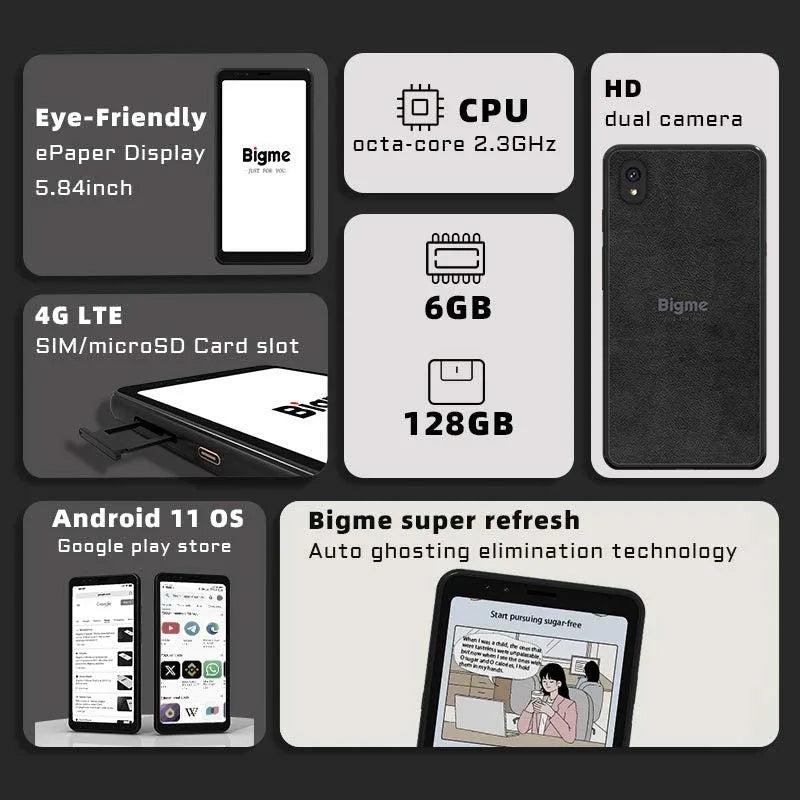
long battery e ink smartphone android 💡 See it in action
👉 Ready to experience less eye strain and more focus?
Frequently Asked Questions
1. What is an e ink display and how does it work?
E ink displays use microcapsules filled with charged particles that move to create text and images. Unlike traditional screens, they reflect light instead of emitting it, making them easier on the eyes and more energy-efficient.
2. Is an e ink mobile phone good for daily use?
Yes, especially for reading, messaging, and productivity. While it may not replace a full multimedia phone, it excels in focus-driven tasks and long battery performance.
3. Is e ink better than OLED for eye comfort?
For prolonged reading and reduced eye strain, e ink is generally better because it avoids blue light and glare. OLED offers better visuals but can cause fatigue over time.
4. Can kids safely use an e ink phone?
E ink phones are a safer alternative for children due to lower eye strain and reduced stimulation. They promote reading and healthier screen habits compared to traditional smartphones.
Pillar Article: Smartphone e ink for sensitive eyes: best use cases guide
Other Related Articles:
Explore More:





