

E-Ink vs LCD for Long Reading Sessions: Which Feels Better?
Featured Answer: Is E-Ink Better Than LCD or OLED for Long Reading Sessions?
E-Ink displays use microscopic electronic ink particles to create text and images that resemble printed paper instead of relying on a continuously illuminated screen. Compared with LCD and OLED displays, E-Ink is widely preferred for extended reading because it offers a more paper-like viewing experience, excellent visibility in bright environments, and exceptional battery efficiency. While LCD and OLED remain the better choice for video, gaming, and fast-moving apps, E-Ink is ideal for ebooks, articles, PDFs, and distraction-free reading.
Comparison Snapshot: E-Ink vs LCD vs OLED
| Feature | E-Ink | LCD | OLED |
|---|---|---|---|
| Eye Comfort | Excellent, paper-like reflective display | Moderate during extended reading | Good, though prolonged viewing may still cause visual fatigue |
| Battery Life | Excellent (days to weeks) | Moderate | Moderate to lower with heavy use |
| Outdoor Visibility | Excellent in direct sunlight | Good with high brightness | Good but affected by glare |
| Refresh Rate | Slow | Fast | Very fast |
| Best Use | Reading, studying, note-taking, focus | Everyday smartphone use | Videos, gaming, multimedia |
E-Ink vs LCD and OLED: Which Display Is Better for Reading?
E-Ink devices are changing how people read digital content by prioritizing comfort, focus, and battery life over visual effects. Whether you're reading ebooks, reviewing documents, or helping children develop healthier screen habits, understanding the differences between E-Ink, LCD, and OLED displays makes it easier to choose the right device for your needs.
Discover how E-Ink devices can help reduce distractions, improve focus, and make long reading sessions easier on your eyes.
What Is E-Ink?
E-Ink , also known as electronic ink, is a display technology designed to reproduce the appearance of printed paper. Rather than shining light directly toward your eyes like LCD or OLED screens, an E-Ink display reflects ambient light, creating text with high readability and minimal visual distraction.
Although E-Ink technology is found in dedicated e-readers, tablets, and smartphones, its primary strength is reading-focused use. The slower refresh rate makes it less suitable for gaming or streaming video, but it excels at ebooks, articles, study materials, note-taking, and other tasks that benefit from prolonged concentration.
For readers who value eye comfort over vibrant colors or fast animations, E-Ink provides a balanced digital reading experience that feels much closer to paper.
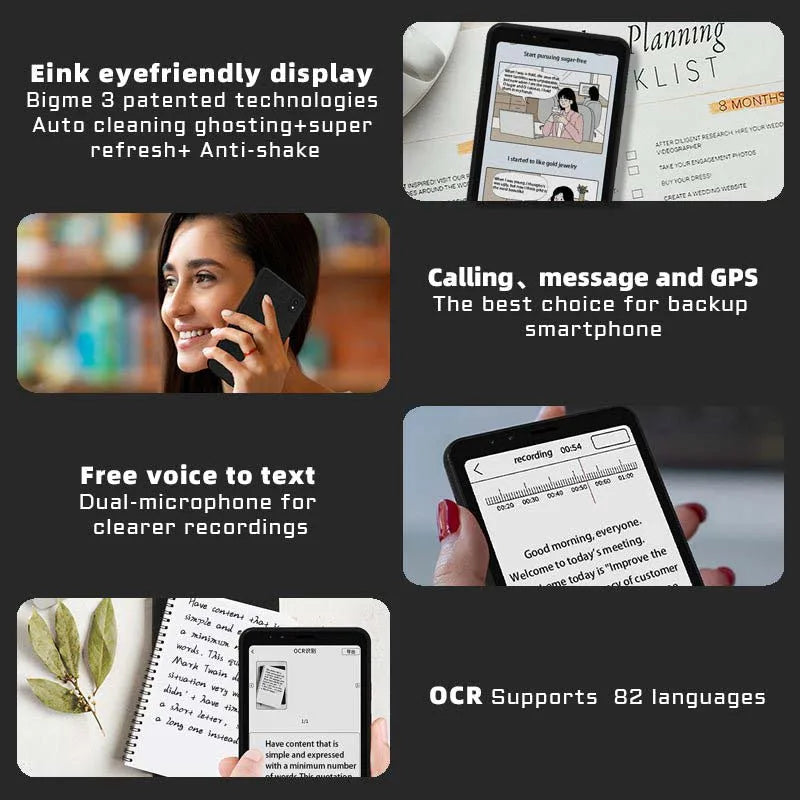
E-Ink compared with LCD and OLED displays for comfortable reading. See it in action.
Learn how E-Ink technology supports comfortable reading, focused study sessions, and healthier everyday screen habits.
E-Ink vs LCD vs OLED: Which Display Is More Comfortable for Your Eyes?
Eye comfort depends on several factors, including screen brightness, glare, reading duration, and how a display produces images. E-Ink stands apart because it reflects ambient light instead of continuously shining light toward your eyes, making it especially well suited for extended reading. LCD and OLED displays offer smoother animations and richer colors, but they are generally optimized for multimedia rather than prolonged text-based tasks.
- E-Ink: Paper-like reflective display with excellent comfort for long reading sessions.
- LCD: Bright, versatile, and responsive, though extended reading may contribute to visual fatigue for some users.
- OLED: Outstanding contrast and color quality for entertainment, but continuous light emission can become tiring during lengthy reading sessions.
- Best choice for reading: E-Ink remains the preferred option when reading ebooks, articles, research papers, or other long-form content.
It's also worth noting that eye fatigue is influenced by overall screen habits. Regular breaks, comfortable viewing distance, and appropriate ambient lighting all contribute to a more comfortable reading experience regardless of display technology.
Is E-Ink a Better Choice for Children?
Parents comparing E-Ink with LCD devices often focus on how each display supports learning rather than entertainment. While no screen completely eliminates eye fatigue, E-Ink devices can encourage healthier reading habits by providing a distraction-reduced interface that emphasizes books, documents, and educational materials.
Unlike many traditional smartphones, E-Ink devices typically make fast-paced games and colorful animations less appealing. This naturally shifts attention toward focused reading, homework, and note-taking instead of prolonged recreational screen use.
- Supports sustained reading and study sessions.
- Reduces exposure to bright, highly stimulating visual effects.
- Encourages better concentration during educational activities.
- Helps separate reading time from entertainment-focused screen use.
Children should still follow age-appropriate screen-time recommendations, take frequent breaks, and spend time outdoors to support healthy visual development. E-Ink is best viewed as one tool that can complement good digital habits rather than replace them.
Using an E-Ink display for focused reading and reduced digital distractions. See it in action.
Compare how different screen technologies support learning, focus, and comfortable reading before selecting your next device.
E-Ink vs OLED in Everyday Reading
The differences between E-Ink and OLED become most apparent during extended reading sessions. OLED displays excel when viewing colorful images, streaming video, or using interactive apps, while E-Ink is optimized for reading text comfortably over long periods with minimal visual distraction.
E-Ink screens remain highly readable in bright outdoor conditions because they rely on reflected ambient light rather than continuous illumination. Combined with extremely low power consumption, this makes them a practical choice for commuters, students, researchers, and anyone who spends hours reading digital content.
- Outdoor readability: E-Ink performs exceptionally well in direct sunlight.
- Battery life: E-Ink devices often operate for days or even weeks between charges, depending on usage.
- Focused reading: The simplified display encourages concentration by minimizing visual distractions.
- Multimedia: OLED remains the better option for videos, gaming, and fast-moving applications.
For readers who primarily consume ebooks, articles, PDFs, or study materials, the trade-off of a slower refresh rate is often outweighed by the improved reading experience and extended battery life.
Readers looking for an Android-based E-Ink device can explore the Eye-Friendly Android Reader e Ink Smartphone , which combines paper-like reading comfort with essential smartphone functionality for distraction-reduced daily use.
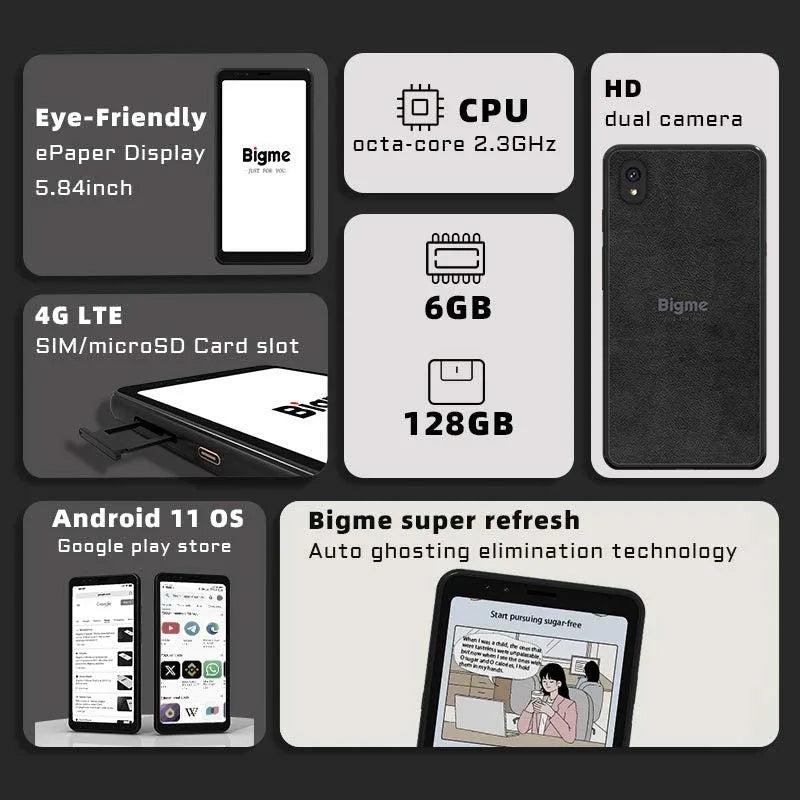
An Android E-Ink device designed for comfortable reading and long battery life. See it in action.
Pros and Cons of E-Ink Devices
| Advantages | Limitations |
|---|---|
|
|
Real-World Reading Experience: E-Ink vs LCD
People who switch from LCD or OLED devices to E-Ink often notice the biggest difference during extended reading rather than short sessions. Instead of emphasizing vivid colors or animations, E-Ink is designed to keep text clear and comfortable for prolonged use.
- "I can comfortably read for much longer without feeling the need to rest my eyes."
- "The distraction-free screen helps me stay focused on books and study materials."
- "Charging once every several days—or even weeks with light use—is a major advantage."
While individual experiences vary, many readers appreciate the combination of long battery life, outdoor readability, and a paper-like display that supports sustained concentration.
FAQ: E-Ink vs LCD and OLED
Is E-Ink really better than LCD for reading several hours a day?
For most people, yes. E-Ink displays are optimized for long-form reading by using reflective technology that resembles paper, making them more comfortable than traditional LCD screens during extended reading sessions.
Does E-Ink reduce eye strain according to research?
Research suggests that visual comfort depends on several factors, including brightness, glare, viewing distance, and reading duration. Many users find E-Ink more comfortable for prolonged reading because it reduces glare and provides a paper-like viewing experience, although taking regular breaks remains important regardless of display type.
Is blue light the main reason LCD causes fatigue?
Not entirely. Eye fatigue is influenced by multiple factors such as prolonged focusing, reduced blinking, screen brightness, glare, and viewing habits. Blue light is only one part of the overall picture.
Can an Android E-Ink tablet replace an LCD tablet?
It depends on your workflow. If your primary activities include reading, writing, annotating documents, and note-taking, an Android E-Ink device can replace many LCD tablet tasks. For gaming, video editing, or multimedia consumption, LCD and OLED remain the better choice.
Why is E-InK battery life so much longer than LCD?
E-Ink screens consume power mainly when changing the displayed content. Because the image remains visible without constant refresh or backlighting, battery life is significantly longer than on LCD or OLED devices.
Is OLED better than E-Ink for reading ebooks?
OLED offers sharper colors and faster responsiveness, but E-Ink generally provides greater comfort for reading ebooks over long periods, particularly in bright environments.
Are E-Ink devices suitable for children?
E-Ink devices can be a good choice for reading-focused activities because they minimize visual distractions and encourage sustained attention. They should still be used alongside healthy screen-time habits, regular breaks, and age-appropriate supervision.
Which display is better for PDFs and note-taking?
For text-heavy PDFs, annotation, and handwritten notes, modern E-Ink devices perform well and are comfortable for extended work. If your documents rely heavily on color graphics, animations, or multimedia content, an LCD or OLED display may be more practical.
Related Articles:
- Android e ink phone vs regular smartphones: Eye comfort test
- E ink phone comparison: Top minimalist models reviewed
- Compact e ink tablet vs Kindle: Best lightweight option
- Android e ink reader review vs tablets: Reading performance
- Phone e ink vs E Ink smartphone: Which is better for reading
Pillar Articles:





