

Does a zigbee sensor compatible with tuya really improve home stability?
Yes. A zigbee sensor compatible with tuya helps create a more stable home environment by providing continuous temperature and humidity readings that power smart automations and instant alerts. When paired with a Tuya-compatible Zigbee hub, the sensor can automatically control humidifiers, dehumidifiers, fans, thermostats, and other connected devices to maintain comfortable indoor conditions while reducing unnecessary energy use.
⏱ 7 min read
Zigbee Sensor Compatible with Tuya: How Its Features Improve Home Stability
Whether you're monitoring a baby's nursery, protecting a basement from excess moisture, or improving whole-home comfort, a zigbee sensor compatible with tuya removes the guesswork from climate management. As a reliable zigbee temp humidity sensor, it continuously measures environmental conditions and shares real-time data with the Tuya Smart or Smart Life ecosystem. The result is smarter automations, more consistent indoor comfort, improved energy efficiency, and fewer manual adjustments throughout the day.
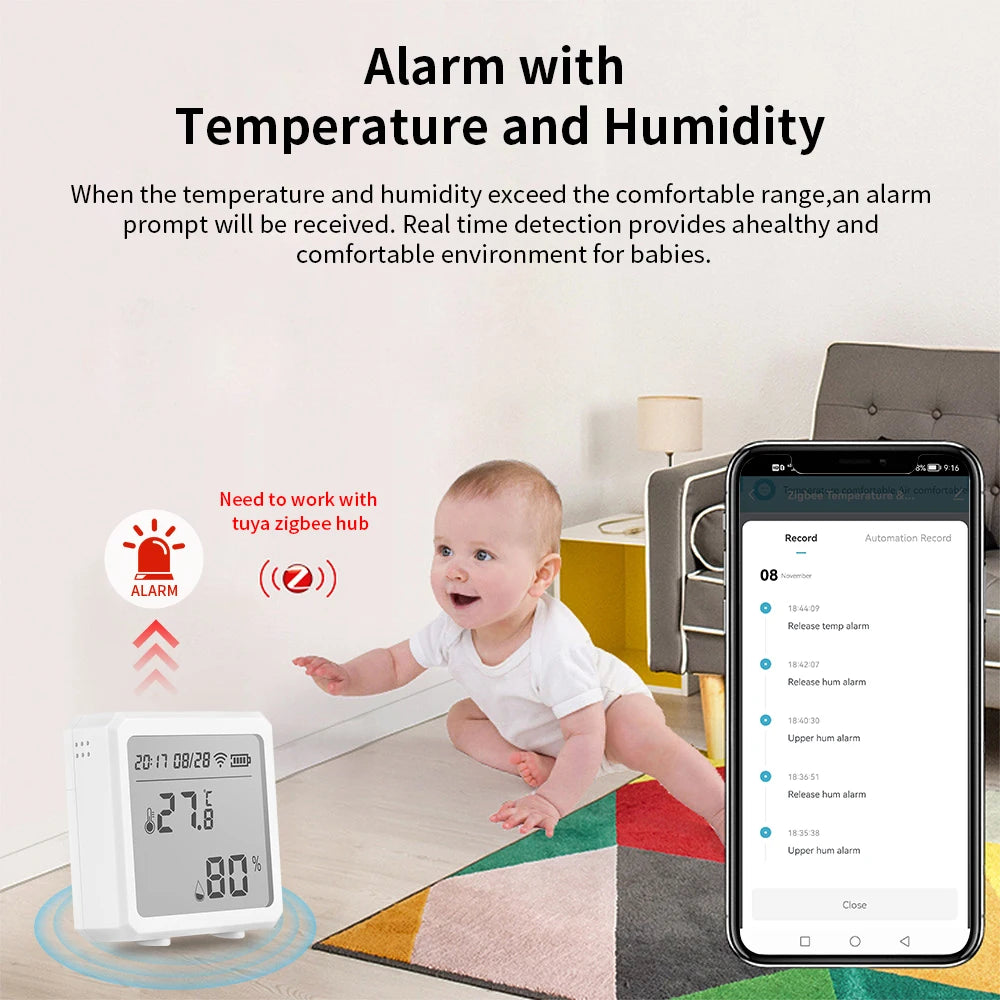
zigbee sensor compatible with tuya, zigbee temp humidity sensor. See it in action.
What Is a Zigbee Sensor Compatible with Tuya?
A zigbee sensor compatible with tuya is a Zigbee-based smart sensor designed to communicate with the Tuya ecosystem through a compatible Zigbee gateway. Most models monitor temperature and humidity, while some also report battery status, signal strength, and historical environmental trends inside the Tuya Smart or Smart Life app.
Quick compatibility answer
A zigbee sensor compatible with tuya measures temperature and humidity, then securely sends those readings to a Tuya Zigbee hub. The hub shares the data with the Tuya Smart or Smart Life app, allowing you to create automations such as switching on a humidifier when humidity drops or sending notifications when room temperatures exceed your preferred range.
Does Zigbee sensor work with Tuya?
Yes—but only if the sensor supports the Tuya Zigbee ecosystem. Unlike Wi-Fi devices, Zigbee sensors cannot connect directly to your home router. Instead, they require a compatible Zigbee gateway that acts as the bridge between the sensor and the Tuya cloud. Once paired successfully, the sensor can participate in scenes, schedules, alerts, and multi-device automations.
- Requires a Tuya-compatible Zigbee hub or gateway.
- Works with the Tuya Smart or Smart Life mobile app after pairing.
- Supports automations with compatible smart plugs, thermostats, switches, and other Tuya devices.
- Consumes very little power, allowing many sensors to operate for months or even years on a single battery.
Tuya-certified vs generic Zigbee 3.0 sensors
Not every Zigbee 3.0 device offers identical compatibility. Tuya-certified sensors are typically tested for seamless integration with Tuya gateways and applications, making setup simpler and automation support more predictable. Generic Zigbee 3.0 sensors may also work, but available features can vary depending on the gateway firmware and supported Zigbee profiles.
| Feature | Tuya-certified sensor | Generic Zigbee 3.0 sensor |
|---|---|---|
| Pairing with Tuya gateway | Typically straightforward | May vary by manufacturer |
| Smart Life app support | Fully supported | Depends on compatibility |
| Automation reliability | Generally consistent | May have limited functions |
| Recommended for beginners | Yes | Best for experienced users who verify compatibility |
How This Zigbee Temp Humidity Sensor Improves Home Stability
Indoor conditions naturally fluctuate throughout the day as outdoor temperatures change, HVAC systems cycle, and humidity levels rise or fall. A zigbee temp humidity sensor continuously monitors these changes so your smart home can respond automatically instead of waiting for someone to notice the problem.
- Provides accurate real-time temperature and humidity readings.
- Triggers automations immediately when preset thresholds are reached.
- Sends notifications if rooms become too hot, too cold, too humid, or too dry.
- Helps HVAC equipment operate more efficiently by responding to actual environmental conditions.
- Creates historical records that help identify recurring comfort or moisture problems.
Top benefits in everyday language
- Fewer nighttime room checks because the app monitors conditions continuously.
- More consistent nursery, bedroom, or living room comfort.
- Reduced energy waste through automation instead of fixed schedules.
- Greater peace of mind thanks to real-time alerts and remote monitoring.
Key Features & Technology That Outperform Alternatives
The best Tuya-compatible Zigbee sensors combine accurate environmental monitoring with dependable wireless communication. Together, these features make automations faster, more reliable, and more energy efficient than many Wi-Fi-only alternatives.
- Zigbee mesh networking: Each powered Zigbee device can help extend network coverage, improving reliability throughout larger homes.
- High measurement accuracy: Many quality sensors deliver temperature accuracy around ±0.3°C and humidity accuracy between ±2% and ±3% RH, providing dependable data for automations.
- Excellent battery efficiency: Zigbee's low-power protocol allows long operating life using compact replaceable batteries.
- Native Tuya compatibility: Easy integration with Tuya Smart and Smart Life simplifies device management, scheduling, and automation creation.
- On-device display and mobile alerts: Many models include an LCD screen while simultaneously sending notifications through the app.
Why this works better than Wi-Fi-only sensors
Unlike Wi-Fi sensors that compete for bandwidth with streaming devices, computers, and phones, Zigbee creates a dedicated low-power mesh network optimized for smart home devices. This reduces wireless congestion, improves connection stability, extends battery life, and allows sensors to continue communicating efficiently even as your smart home grows.
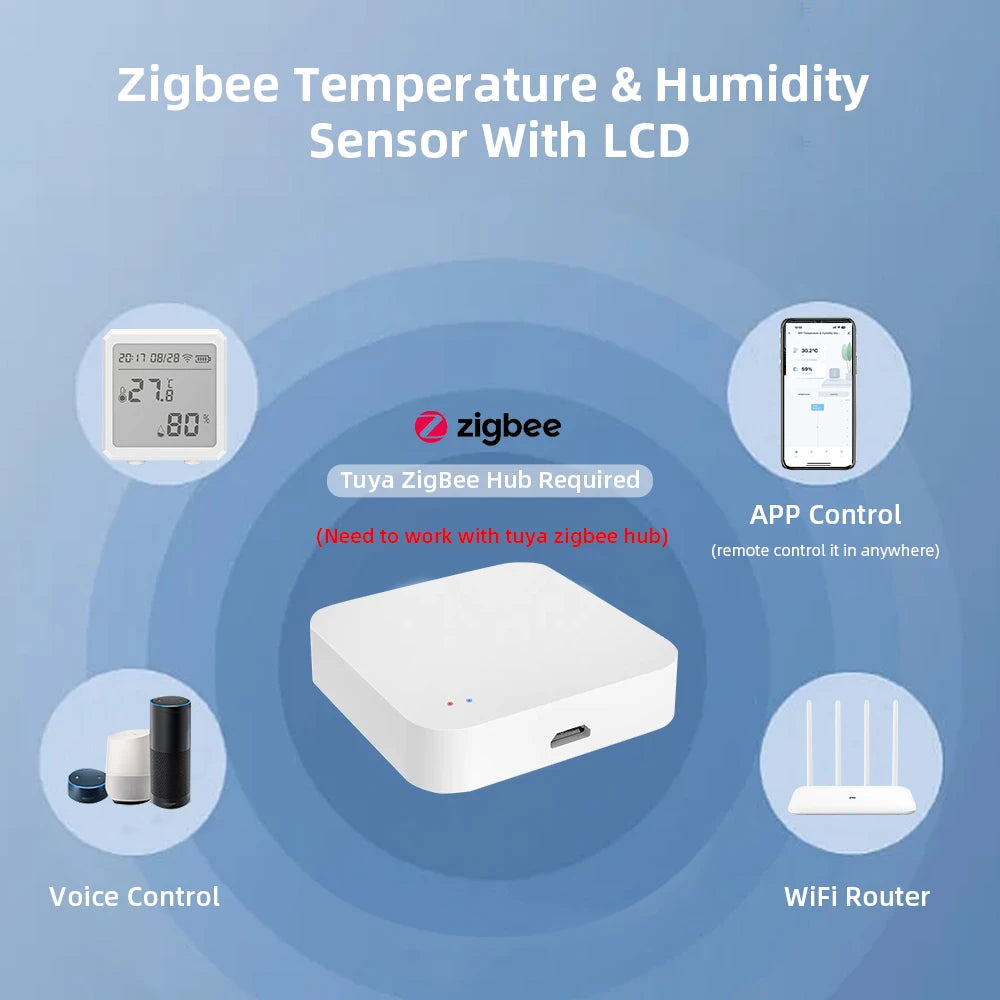
zigbee temp humidity sensor, purpose of environmental monitoring. See it in action.
Quick Comparison: Zigbee vs Wi-Fi vs BLE
Choosing the right wireless protocol has a significant impact on battery life, reliability, and automation performance. For environmental monitoring, a Zigbee home automation sensor is typically the best option because it combines low power consumption with a self-healing mesh network that remains dependable even as more smart devices are added.
| Feature | Zigbee (Best for) | Wi-Fi (Best for) | Bluetooth (BLE) |
|---|---|---|---|
| Power efficiency | Excellent — battery life often measured in months or years | Higher power consumption | Good for low-power, short-range devices |
| Network range & reliability | Self-healing mesh network extends coverage through compatible devices | Limited by router coverage and network congestion | Short-range point-to-point communication |
| Automation responsiveness | Fast local communication for smart home automations | Often cloud-dependent | Suitable for nearby devices only |
| Integration with Tuya | Native support through Tuya Zigbee gateways | Available for supported Wi-Fi devices | Gateway often required |
| Best use | Home sensors, environmental monitoring, and automations | Cameras, streaming devices, and high-bandwidth equipment | Wearables, beacons, and proximity applications |
How to Connect a Zigbee Sensor to Tuya
Most Tuya-compatible Zigbee sensors can be connected within a few minutes. Before pairing, verify that your Zigbee gateway is already online and connected to the Tuya Smart or Smart Life app.
Required hub
A Zigbee temperature and humidity sensor requires a compatible Tuya Zigbee gateway because Zigbee devices do not connect directly to a standard Wi-Fi router. The gateway manages communication between the sensor and your smart home ecosystem.
Pairing process
- Insert the batteries into the sensor.
- Open the Tuya Smart or Smart Life app.
- Place the Zigbee gateway into pairing mode.
- Press the sensor's pairing button until the indicator begins flashing.
- Wait for the app to discover the device and assign it to a room.
Smart Life app setup
After pairing, customize the device name, organize it by room, and configure automation rules. Most users create temperature and humidity thresholds that automatically trigger compatible smart plugs, fans, humidifiers, or dehumidifiers.
Verification steps
- Confirm live temperature and humidity updates appear in the app.
- Test a simple automation to verify successful communication.
- Check battery level reporting.
- Review signal strength and relocate the sensor if connectivity is weak.
Real-world automation examples
- Climate control: Turn on a humidifier whenever humidity falls below 40% and switch it off after reaching the target level.
- Nursery comfort: Send an alert if room temperature exceeds 78°F or falls below your preferred sleeping range.
- Basement moisture protection: Automatically activate a dehumidifier when humidity rises to levels that encourage mold growth.
- Energy-saving routines: Run HVAC equipment only when sensor readings indicate genuine demand instead of relying solely on fixed schedules.
Pros & Cons
A Zigbee sensor compatible with Tuya offers dependable smart home monitoring, but understanding both its strengths and limitations helps determine whether it fits your automation goals.
| ✅ Pros | ❌ Cons |
|---|---|
|
|
Buying Guide: What to Look For
Selecting the right Zigbee temperature and humidity sensor is about more than finding the lowest price. A quality tuya compatible zigbee sensor should provide reliable measurements, dependable wireless connectivity, and broad automation support so it continues to perform as your smart home expands.
Compatibility checklist
- Verify the product explicitly supports the Tuya Smart or Smart Life ecosystem.
- Confirm compatibility with your existing Tuya Zigbee gateway.
- Check that temperature, humidity, battery status, and offline alerts are supported.
- Look for automation support within the Tuya app.
Zigbee version
Whenever possible, choose a Zigbee 3.0 sensor. The newer standard offers improved interoperability, stronger security, and better compatibility with modern Tuya gateways compared with many older Zigbee implementations.
Battery life
Battery performance varies by reporting frequency and room conditions. Most quality Zigbee sensors are designed to operate for many months or even years on a single battery, making them ideal for continuous environmental monitoring with minimal maintenance.
Automation support
Before purchasing, verify that the sensor can trigger the automations you intend to use. Common examples include:
- Switching humidifiers or dehumidifiers on and off automatically.
- Activating fans when room temperatures exceed a specified threshold.
- Sending push notifications when readings move outside your preferred comfort range.
- Participating in multi-device smart home scenes.
See product details and buy: Zigbee Temperature & Humidity Sensor — KentDO
Placement & Installation Tips for Best Results
Temperature sensor placement
Proper placement is essential for accurate environmental monitoring. Position the sensor where it measures the actual room conditions instead of temporary hot or cold spots.
- Mount the sensor away from direct sunlight.
- Keep it clear of heating vents, air conditioners, fireplaces, and exterior doors.
- Place it at approximately the same height as the area being monitored, such as crib level in a nursery or desk height in a home office.
Signal optimization
Although Zigbee mesh networking offers excellent reliability, wireless performance improves when the gateway and nearby Zigbee routers have a clear communication path.
- Reduce large metal objects between the sensor and gateway.
- Add powered Zigbee devices to strengthen the mesh network in larger homes.
- Avoid placing the gateway inside enclosed cabinets or behind thick concrete walls.
Avoiding inaccurate readings
- Allow the sensor to stabilize for several minutes after installation.
- Monitor historical readings for 24 to 48 hours before fine-tuning automation thresholds.
- Replace batteries promptly when low-battery notifications appear.
- Clean the sensor periodically to prevent dust from affecting airflow around the sensing elements.
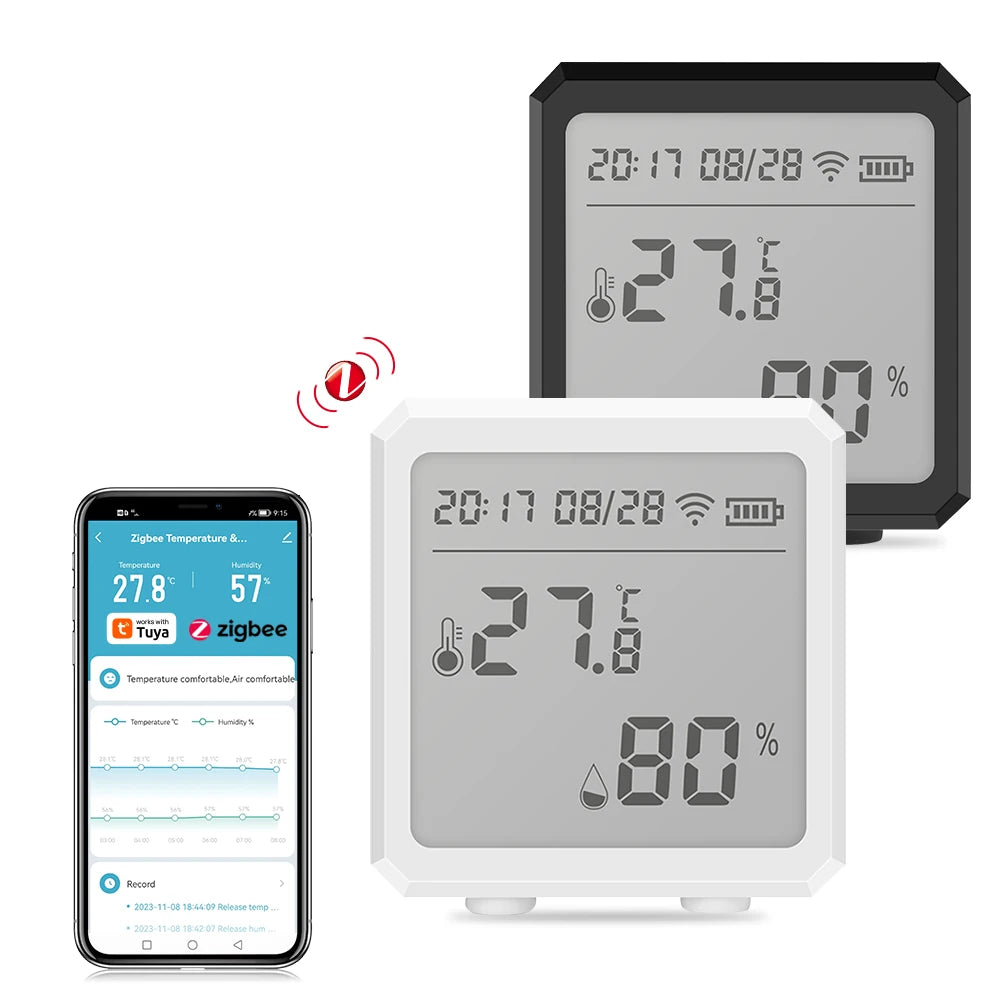
smart humidity sensor, efficient home temperature settings. See it in action.
Frequently Asked Questions
-
Does every Zigbee sensor work with Tuya?
Not always. Only sensors that explicitly support the Tuya ecosystem or are compatible with your Tuya Zigbee gateway will provide full functionality. While some generic Zigbee 3.0 devices may pair successfully, available features and automation support can vary between manufacturers. -
Do I need a Tuya Zigbee gateway to use these sensors?
Yes. Most Zigbee temperature and humidity sensors require a Tuya-compatible Zigbee gateway because they cannot communicate directly with a standard Wi-Fi router. The gateway connects the sensor to the Tuya Smart or Smart Life app. -
Can Tuya Zigbee sensors work with Home Assistant?
Many Tuya-compatible Zigbee sensors can be integrated with Home Assistant using supported Tuya integrations or compatible Zigbee coordinators. Compatibility depends on your gateway, firmware, and the specific sensor model. -
What is the difference between Tuya Zigbee and Zigbee 3.0?
Zigbee 3.0 is the wireless communication standard, while Tuya Zigbee refers to devices designed to operate within Tuya's smart home ecosystem. A Zigbee 3.0 device is not automatically guaranteed to support every Tuya feature. -
How do I connect a Zigbee sensor to the Tuya Smart Life app?
Install batteries, place your Tuya Zigbee gateway into pairing mode, reset the sensor according to the manufacturer's instructions, then add the device through the Tuya Smart or Smart Life app. Once paired, assign it to a room and create automations as needed. -
Why is my Tuya Zigbee sensor not pairing?
Common causes include a sensor that is too far from the gateway, low battery power, an incompatible Zigbee device, or the gateway not being in pairing mode. Resetting the sensor and moving it closer to the hub often resolves the issue. -
Which Tuya-compatible Zigbee temperature and humidity sensor is best?
Look for a model that offers accurate measurements, Zigbee 3.0 compatibility, long battery life, reliable reporting intervals, and full automation support within the Tuya Smart ecosystem. The Zigbee Temperature & Humidity Sensor — KentDO is designed to meet these requirements for everyday home monitoring. -
Can Alexa use Tuya Zigbee sensors through a Tuya hub?
Yes. After linking your Tuya account with Alexa, supported Zigbee sensors can participate in Alexa routines and voice-controlled smart home automations, depending on the capabilities exposed by the Tuya platform.
Final Verdict
A zigbee sensor compatible with tuya is one of the most practical upgrades for anyone looking to improve indoor comfort, automate climate control, and monitor environmental conditions with minimal maintenance. Its low-power Zigbee communication, dependable mesh networking, and seamless Tuya integration make it well suited for nurseries, bedrooms, basements, offices, and other spaces where temperature and humidity matter.
Choosing a quality sensor with reliable accuracy, long battery life, and full automation support allows your smart home to respond automatically to changing conditions instead of relying on constant manual adjustments. Whether your goal is protecting indoor air quality, improving energy efficiency, or creating a more comfortable living environment, a Tuya-compatible Zigbee sensor delivers long-term value while remaining easy to expand as your smart home grows.
Related items to consider: Explore Monitoring Devices or Temperature Tools for complementary gear that extends the solution.
Pillar Article: Guide to Smart Home Sensors: Why These Features Deliver Better Climate Control
Other Related Articles:
Explore More:





